There is a glitch on some Shopify stores in the Abandoned cart notifications.

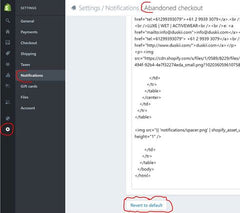
To check if this is happening to you, go to admin/settings/notifications, and click into Abandoned Cart. If you see the message "Body is missing the {{ custom_message }} drop." then your abandonment messages are probably scrambled.
I've followed up with Shopify on a global fix for this and they are working on it, but if you want to fix it in the meantime, copy and paste your current message somewhere safe (in a text doc) and click on the 'revert to default' button at the bottom and save. You can preview the result from the drop down under the '...' button at the top right.
Here's what it means and what to do.
This is a stellar example of what happens when you consistently show up and put your genuine self into your content.
Writers and journalists are always looking for authentic voices, and if you're publishing regularly, you're infinitely easier to find. Read how Chris did it.
From June 3 2026, Shopify is making some small changes to the information it asks your customers for when they check out. Nothing big, but it's worth knowing about so there are no surprises.